

Valhally Casino Login
The personal profile provides access to settings, betting history and fund management in one place. At Valhally Casino, registration begins with a short form containing Email and Password fields, while returning to an existing account requires signing in. To reach the right function immediately, it is worth understanding the difference between creating a new profile, verifying contact details and logging in again.
The First Form: Two Fields, Password Rules and Age Confirmation
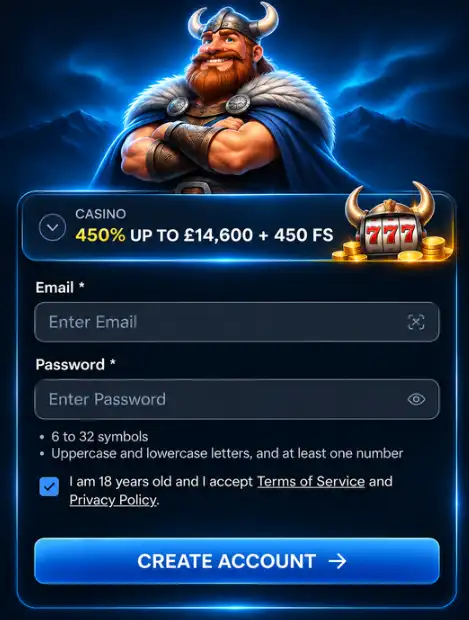
After clicking Create Account, a registration form opens with Email and Password fields. Enter your email address carefully, as it is used for notifications and account recovery. The password must contain between 6 and 32 characters, including uppercase and lowercase letters and at least one number. The eye icon next to the field allows you to check what you have entered before continuing.
Below the fields is a checkbox confirming that you are aged 18 or over and accept the Terms of Service and Privacy Policy. Read these documents before ticking the box. The CREATE ACCOUNT button takes you to the next stage of account registration.
How to Complete Registration and Access Your Personal Profile
The next stage of Valhally Casino registration requests personal information, including your first name, surname, date of birth, telephone number and address. Complete these fields using the details shown on your official documents, as this information may be required during subsequent verification. Before submitting the form, double-check the spelling of your name and your contact details.
- Check your email address and password strength in the first form.
- Enter your personal details and make sure your date of birth is correct.
- Confirm account creation and open your profile dashboard.
After registering, you can check your balance, review the status of bonus offers and monitor your activity. There is no need to complete the same registration form again: future sessions use the login form instead.
Returning to Your Account Without Registering Again
Valhally Casino Login is designed for players who already have an account. In the Login form, enter the email address used during registration and the corresponding password. Before clicking the sign-in button, check your keyboard layout and letter case. If you are using someone else's device, avoid saving your login credentials in the browser.
| Situation | What to Do |
|---|---|
| New Player | Open Register and complete the registration form |
| Existing Account | Go to Login and enter your credentials |
| Forgotten Password | Use email-based password recovery |
| Changed Device | Sign in using your usual account credentials |
Contact Details, History and Settings in Your Account
The Valhally Casino profile brings together personal information, transaction history and the Verification section. This area makes it convenient to check the status of requests and review account activity. If your contact details have changed, check them in the settings and contact customer support if the relevant field cannot be edited.
- Check that your name and address match your identification documents.
- Monitor your transaction history and keep any necessary transaction reference numbers.
- Sign out of your account after using a shared computer.
Keeping your profile up to date is particularly useful before requesting a withdrawal, as ownership of the payment method and the accuracy of personal details may form part of the verification process. This provides players with one central account area instead of several separate forms.
Verification: How to Prepare Your Documents
The Verification section may request confirmation of your identity, residential address and payment method. Accepted documents may include a passport, driving licence or another suitable form of identification. Proof of address may require a recent utility bill or bank statement. Upload clear images without cropped edges and check the verification status in your personal account.
| Category | What to Prepare |
|---|---|
| Identity | A document showing your photograph and date of birth |
| Address | A document showing your name and current address |
| Payment Method | Confirmation that the payment method belongs to you |
Never share your bank card's full security code. Use the appropriate section of your account to upload documents rather than submitting them through third-party forms.
How to Recover Access and Protect Your Next Login
If your password is not accepted, use the recovery option on the login page. Instructions will be sent to the email address linked to your profile. When creating a new password, avoid reusing previous combinations and never share your access credentials with anyone else.
When signing in from a smartphone, use the same account as on your computer. After finishing your session, make sure you have logged out, particularly if the phone does not belong to you. If necessary, ask customer support about the available betting restrictions or self-exclusion options.
A Profile You Can Easily Return To
The most convenient approach at Valhally Casino is to complete the registration form carefully once, keep your contact information accurate and use Login for future visits. The personal account combines history, documents and data management, so your next session begins with the action you need rather than another registration form.
FAQ
Do I Need to Verify My Email Address After Registration?
After creating an account, it is recommended to complete verification through the Verify Email section. Open the email containing the verification link and follow the instructions. Email verification also allows players to claim 10 free spins in accordance with the promotion's terms.
What Are the Password Requirements When Creating an Account?
Your password must contain between 6 and 32 characters, including uppercase and lowercase letters and at least one number. For additional security, use a unique combination.
Can I Change My Personal Details After Creating a Profile?
You can review your contact details and personal information in your account dashboard. If a particular field cannot be edited, contact customer support to find out how to update the relevant information.
Why Is It Important to Provide Accurate Details During Registration?
Personal information is used to identify the account holder and complete KYC verification. Providing your correct name, date of birth and address helps ensure that your profile information matches your official identification documents.
What Should I Do If I Cannot Log In to Valhally Casino?
Check your email address, password and keyboard layout for errors. If you still cannot access your account, use the password reset function. For further assistance, contact customer support through the available communication channels.